
In today’s digital workplace, people spend more time in front of computer screens than ever before. Whether working in an office, remotely from home, or in professions such as graphic design, software development, and video editing, prolonged screen use has become a daily routine. Yet many individuals experience neck stiffness, shoulder discomfort, and even headaches despite not engaging in physically demanding work.
One often-overlooked cause is improper monitor height. Although the difference may seem minimal, even a few centimeters of incorrect screen positioning can place additional strain on the cervical spine and shoulder muscles over time, negatively affecting both physical well-being and work performance.
How Does Monitor Height Impact Neck and Shoulder Health?
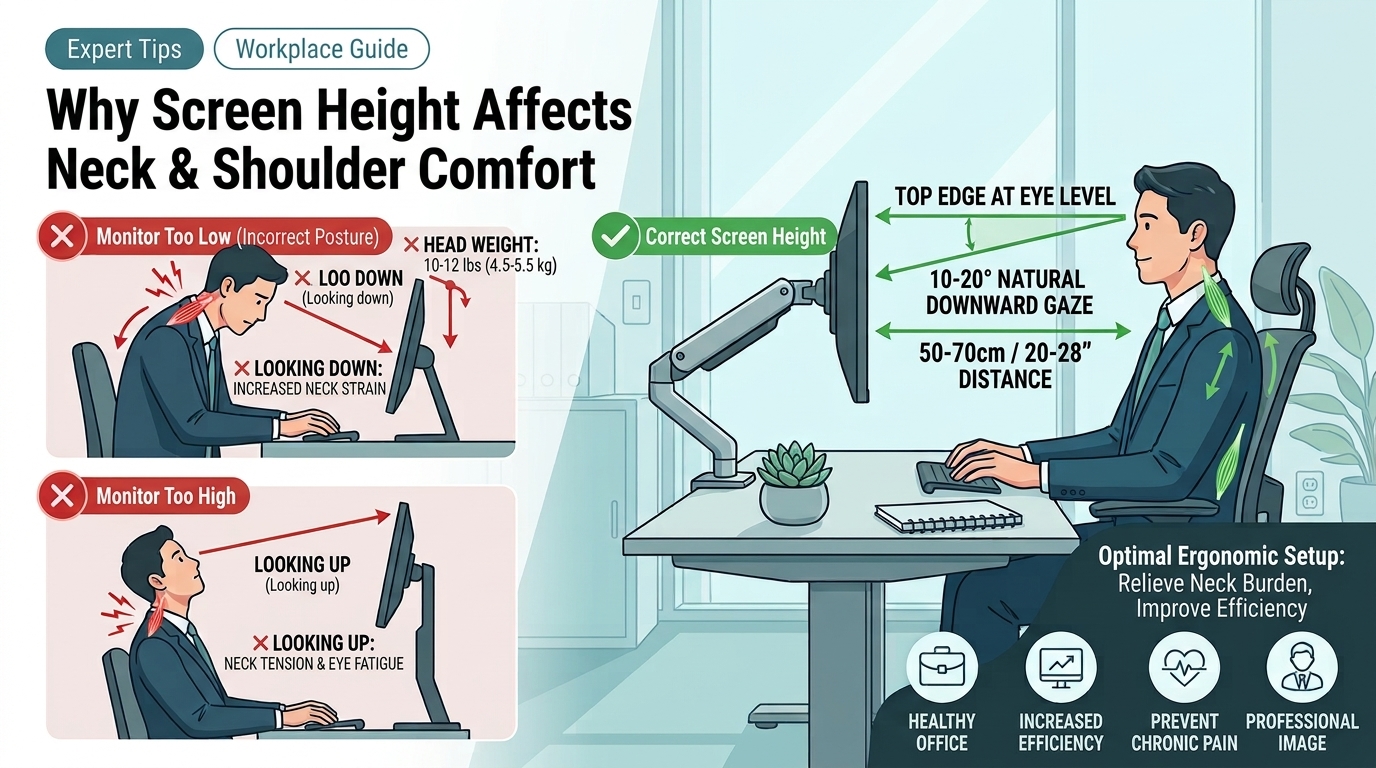
The average human head weighs approximately 4.5 to 6 kilograms. Under proper posture, this weight is evenly supported by the cervical spine and surrounding muscles. However, when a monitor is positioned at an ergonomically incorrect height, users tend to tilt their heads upward or downward to view the screen.
Maintaining these unnatural positions for extended periods places continuous stress on the neck and shoulder muscles. Over time, this can lead to chronic discomfort, muscle fatigue, and postural issues.
Problems Caused by a Monitor Positioned Too Low
One of the most common ergonomic issues in the workplace is a monitor that sits below eye level. When users consistently look downward, the effective load placed on the neck increases significantly as the head tilts forward. The muscles at the back of the neck must work continuously to support this added weight, leading to fatigue and discomfort.
Common symptoms include:
• Neck stiffness and pain
• Shoulder tension and soreness
• Upper back fatigue
• Tension headaches
• Poor posture, including rounded shoulders and a hunched back
Many people assume that neck and shoulder discomfort is caused by workplace stress or lack of rest. In reality, prolonged downward viewing of a monitor is often a major contributing factor. Even a slight forward head posture, when maintained for hours each day, can place substantial strain on the cervical spine.
A Monitor Positioned Too High Can Also Cause Strain
While a low monitor is a common concern, a monitor positioned too high can be equally problematic. When the screen is significantly above eye level, users must constantly tilt their heads upward, causing excessive extension of the neck. This often leads to increased muscle tension in both the neck and shoulders.
Potential effects include:
• Pain and stiffness in the back of the neck
• Tight and fatigued shoulders
• Eye strain
• Reduced concentration
• Lower productivity
Whether a monitor is positioned too high or too low, both scenarios can place unnecessary stress on the body. The goal is not simply to raise the monitor, but to achieve an ergonomic viewing position that supports natural posture.
What Is the Correct Monitor Height?
To reduce physical strain and improve workplace comfort, consider the following ergonomic guidelines:
1. Align the Top of the Screen with Eye Level
When seated comfortably, the top edge of the monitor should be at or slightly below eye level. This allows the eyes to naturally gaze downward by approximately 10–20 degrees when viewing the center of the screen.
2. Maintain an Appropriate Viewing Distance
The recommended distance between the eyes and the monitor is approximately 50–70 centimeters, or about an arm’s length. This helps reduce eye fatigue while minimizing strain on the neck and shoulders.
3. Keep the Shoulders Relaxed
Avoid hunching the shoulders or leaning forward for prolonged periods. Ensure that the keyboard, mouse, and desk setup also support proper ergonomic positioning.
4. Coordinate Desk, Chair, and Monitor Heights
An ergonomic workstation requires all elements—including the chair, desk, and monitor—to work together. Proper alignment helps maintain a comfortable and sustainable working posture throughout the day.
Why Are Ergonomic Monitor Arms Becoming Increasingly Popular?
As organizations and individuals place greater emphasis on workplace wellness and productivity, ergonomic monitor arms have become a popular office solution.
Unlike traditional fixed monitor stands, ergonomic monitor arms allow users to adjust height, depth, tilt, and screen orientation with ease. This flexibility enables each user to create a personalized viewing setup that best suits their needs.
Reduce Neck and Shoulder Strain
Precise monitor positioning helps minimize poor postural habits such as looking down or craning the neck upward, reducing long-term stress on the cervical spine and surrounding muscles.
Improve Workplace Comfort
Since every individual has different physical characteristics, working habits, and job requirements, adjustable monitor arms provide greater flexibility to create a more comfortable and personalized workstation.
Maximize Desk Space
Traditional monitor bases often occupy valuable desk space. By mounting the monitor on an adjustable arm, users can free up additional workspace for documents, keyboards, notebooks, and other essential tools.
Enhance Productivity
A well-designed ergonomic setup minimizes unnecessary body movements and posture adjustments, allowing users to focus more effectively on their work. This is particularly beneficial for professionals who spend long hours at a computer or frequently multitask.
Create a Healthier Workspace by Optimizing Monitor Height
Many neck and shoulder problems are not caused by workload alone but by poor posture accumulated over time. By setting the monitor at the correct height, designing an ergonomic workstation, and utilizing adjustable monitor arms, users can significantly reduce physical discomfort while improving both comfort and productivity.
Never underestimate the impact of a few centimeters. When a monitor is positioned at the optimal height and angle, both workplace wellness and performance can improve substantially.
